CONEXSOFT BrowserChrome Browser Extensions
We provide extensions that work entirely in the browser — on-screen annotation, tab recording, continuous capture, YouTube English caption learning, and more. Each product page includes screenshots and step-by-step diagrams.
Install from the Chrome Web Store. Some products offer a free tier so you can try before upgrading to Pro.
-
Screen Marker
 A Chrome extension that draws rectangular markers on the web page you are viewing — hold a modifier key and drag. Ideal for presentations, online classes, and pointing during screen sharing.
Highlights
Circle an area instead of saying “look at the top left.” Markers appear in shared screens and tab recordings. Free: one preset, one marker at a time. Pro: three presets, multiple simultaneous markers, full style rendering, and settings export.
Chrome Web Store (rating 5.0 / ~38 users / publisher conexsoft)
-
YouTube English Caption Learning Support
A Chrome extension that displays YouTube English captions in a custom overlay with CEFR difficulty coloring, dictionary lookup, known-word tracking, level estimation, and read-aloud to support English study.
Learning flow
Pause on hover, tap a word for English-English plus Japanese definitions, phrase highlighting, and a side panel of words in the video. Native captions are hidden in favor of the learning display.
-
Browser Tab Recorder
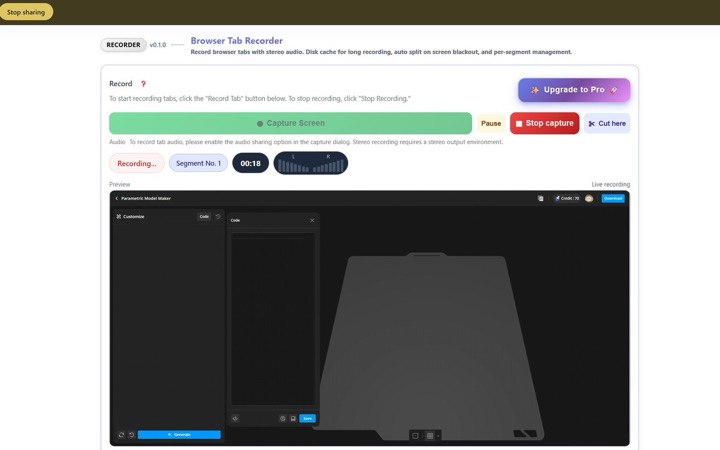 Records the tab, window, or screen you choose in Chrome’s screen-share dialog, together with audio, as WebM. Start, split, and save from a single popup.
Long sessions and auto-split
Chunks saved to IndexedDB. Split or stop based on blackout, still frame, and silence rules. Silent recording, segment merge, and WAV / MP3 / ZIP export. Free tier: 15 minutes per session.
Chrome Web Store (rating 5.0 / ~231 users / publisher conexsoft)
-
Continuous Automatic Page Capture
 Sends arrow keys or scroll events to the active tab while capturing screens in sequence, then saves them as one PDF. Suited to e-book viewers and long documents.
Free / Pro
Free: up to 30 shots per session at 1x resolution. Pro: up to 200 shots, higher resolution, left-right split layout, and automatic key-direction reversal on stop. Processing stays inside the browser.
Chrome Web Store (rating 5.0 / ~56 users / publisher conexsoft)